

Detect objects
curl --request POST \
  --url https://api.perceptron.inc/v1/detect \
  --header 'Authorization: Bearer <token>' \
  --header 'Content-Type: application/json' \
  --data '
{
  "media": {
    "image_url": "<string>",
    "type": "image"
  },
  "categories": [
    "<string>"
  ],
  "config": {
    "enable_thinking": true
  },
  "exemplars": [
    {
      "annotations": [
        {
          "mention": "<string>",
          "index": 123,
          "label": "<string>",
          "point": {
            "x": 123,
            "y": 123
          },
          "point_box": {
            "bottom_right": {
              "x": 123,
              "y": 123
            },
            "top_left": {
              "x": 123,
              "y": 123
            }
          },
          "timestamp": 123
        }
      ],
      "media": {
        "image_url": "<string>",
        "type": "image"
      }
    }
  ],
  "negative_exemplars": [
    {
      "media": {
        "image_url": "<string>",
        "type": "image"
      }
    }
  ]
}
'
import requests
url = "https://api.perceptron.inc/v1/detect"
payload = {
"media": {
"image_url": "<string>",
"type": "image"
},
"categories": ["<string>"],
"config": { "enable_thinking": True },
"exemplars": [
{
"annotations": [
{
"mention": "<string>",
"index": 123,
"label": "<string>",
"point": {
"x": 123,
"y": 123
},
"point_box": {
"bottom_right": {
"x": 123,
"y": 123
},
"top_left": {
"x": 123,
"y": 123
}
},
"timestamp": 123
}
],
"media": {
"image_url": "<string>",
"type": "image"
}
}
],
"negative_exemplars": [{ "media": {
"image_url": "<string>",
"type": "image"
} }]
}
headers = {
"Authorization": "Bearer <token>",
"Content-Type": "application/json"
}
response = requests.post(url, json=payload, headers=headers)
print(response.text)const options = {
method: 'POST',
headers: {Authorization: 'Bearer <token>', 'Content-Type': 'application/json'},
body: JSON.stringify({
media: {image_url: '<string>', type: 'image'},
categories: ['<string>'],
config: {enable_thinking: true},
exemplars: [
{
annotations: [
{
mention: '<string>',
index: 123,
label: '<string>',
point: {x: 123, y: 123},
point_box: {bottom_right: {x: 123, y: 123}, top_left: {x: 123, y: 123}},
timestamp: 123
}
],
media: {image_url: '<string>', type: 'image'}
}
],
negative_exemplars: [{media: {image_url: '<string>', type: 'image'}}]
})
};
fetch('https://api.perceptron.inc/v1/detect', options)
.then(res => res.json())
.then(res => console.log(res))
.catch(err => console.error(err));<?php
$curl = curl_init();
curl_setopt_array($curl, [
CURLOPT_URL => "https://api.perceptron.inc/v1/detect",
CURLOPT_RETURNTRANSFER => true,
CURLOPT_ENCODING => "",
CURLOPT_MAXREDIRS => 10,
CURLOPT_TIMEOUT => 30,
CURLOPT_HTTP_VERSION => CURL_HTTP_VERSION_1_1,
CURLOPT_CUSTOMREQUEST => "POST",
CURLOPT_POSTFIELDS => json_encode([
'media' => [
'image_url' => '<string>',
'type' => 'image'
],
'categories' => [
'<string>'
],
'config' => [
'enable_thinking' => true
],
'exemplars' => [
[
'annotations' => [
[
'mention' => '<string>',
'index' => 123,
'label' => '<string>',
'point' => [
'x' => 123,
'y' => 123
],
'point_box' => [
'bottom_right' => [
'x' => 123,
'y' => 123
],
'top_left' => [
'x' => 123,
'y' => 123
]
],
'timestamp' => 123
]
],
'media' => [
'image_url' => '<string>',
'type' => 'image'
]
]
],
'negative_exemplars' => [
[
'media' => [
'image_url' => '<string>',
'type' => 'image'
]
]
]
]),
CURLOPT_HTTPHEADER => [
"Authorization: Bearer <token>",
"Content-Type: application/json"
],
]);
$response = curl_exec($curl);
$err = curl_error($curl);
curl_close($curl);
if ($err) {
echo "cURL Error #:" . $err;
} else {
echo $response;
}package main
import (
"fmt"
"strings"
"net/http"
"io"
)
func main() {
url := "https://api.perceptron.inc/v1/detect"
payload := strings.NewReader("{\n \"media\": {\n \"image_url\": \"<string>\",\n \"type\": \"image\"\n },\n \"categories\": [\n \"<string>\"\n ],\n \"config\": {\n \"enable_thinking\": true\n },\n \"exemplars\": [\n {\n \"annotations\": [\n {\n \"mention\": \"<string>\",\n \"index\": 123,\n \"label\": \"<string>\",\n \"point\": {\n \"x\": 123,\n \"y\": 123\n },\n \"point_box\": {\n \"bottom_right\": {\n \"x\": 123,\n \"y\": 123\n },\n \"top_left\": {\n \"x\": 123,\n \"y\": 123\n }\n },\n \"timestamp\": 123\n }\n ],\n \"media\": {\n \"image_url\": \"<string>\",\n \"type\": \"image\"\n }\n }\n ],\n \"negative_exemplars\": [\n {\n \"media\": {\n \"image_url\": \"<string>\",\n \"type\": \"image\"\n }\n }\n ]\n}")
req, _ := http.NewRequest("POST", url, payload)
req.Header.Add("Authorization", "Bearer <token>")
req.Header.Add("Content-Type", "application/json")
res, _ := http.DefaultClient.Do(req)
defer res.Body.Close()
body, _ := io.ReadAll(res.Body)
fmt.Println(string(body))
}HttpResponse<String> response = Unirest.post("https://api.perceptron.inc/v1/detect")
.header("Authorization", "Bearer <token>")
.header("Content-Type", "application/json")
.body("{\n \"media\": {\n \"image_url\": \"<string>\",\n \"type\": \"image\"\n },\n \"categories\": [\n \"<string>\"\n ],\n \"config\": {\n \"enable_thinking\": true\n },\n \"exemplars\": [\n {\n \"annotations\": [\n {\n \"mention\": \"<string>\",\n \"index\": 123,\n \"label\": \"<string>\",\n \"point\": {\n \"x\": 123,\n \"y\": 123\n },\n \"point_box\": {\n \"bottom_right\": {\n \"x\": 123,\n \"y\": 123\n },\n \"top_left\": {\n \"x\": 123,\n \"y\": 123\n }\n },\n \"timestamp\": 123\n }\n ],\n \"media\": {\n \"image_url\": \"<string>\",\n \"type\": \"image\"\n }\n }\n ],\n \"negative_exemplars\": [\n {\n \"media\": {\n \"image_url\": \"<string>\",\n \"type\": \"image\"\n }\n }\n ]\n}")
.asString();require 'uri'
require 'net/http'
url = URI("https://api.perceptron.inc/v1/detect")
http = Net::HTTP.new(url.host, url.port)
http.use_ssl = true
request = Net::HTTP::Post.new(url)
request["Authorization"] = 'Bearer <token>'
request["Content-Type"] = 'application/json'
request.body = "{\n \"media\": {\n \"image_url\": \"<string>\",\n \"type\": \"image\"\n },\n \"categories\": [\n \"<string>\"\n ],\n \"config\": {\n \"enable_thinking\": true\n },\n \"exemplars\": [\n {\n \"annotations\": [\n {\n \"mention\": \"<string>\",\n \"index\": 123,\n \"label\": \"<string>\",\n \"point\": {\n \"x\": 123,\n \"y\": 123\n },\n \"point_box\": {\n \"bottom_right\": {\n \"x\": 123,\n \"y\": 123\n },\n \"top_left\": {\n \"x\": 123,\n \"y\": 123\n }\n },\n \"timestamp\": 123\n }\n ],\n \"media\": {\n \"image_url\": \"<string>\",\n \"type\": \"image\"\n }\n }\n ],\n \"negative_exemplars\": [\n {\n \"media\": {\n \"image_url\": \"<string>\",\n \"type\": \"image\"\n }\n }\n ]\n}"
response = http.request(request)
puts response.read_body{
"detections": [
{
"mention": "<string>",
"point": {
"x": 123,
"y": 123
},
"point_box": {
"bottom_right": {
"x": 123,
"y": 123
},
"top_left": {
"x": 123,
"y": 123
}
}
}
],
"finish_reason": "complete"
}{
"error": {
"message": "<string>",
"code": "<string>",
"param": "<string>",
"type": "<string>"
}
}{
"error": {
"message": "<string>",
"code": "<string>",
"param": "<string>",
"type": "<string>"
}
}{
"error": {
"message": "<string>",
"code": "<string>",
"param": "<string>",
"type": "<string>"
}
}{
"error": {
"message": "<string>",
"code": "<string>",
"param": "<string>",
"type": "<string>"
}
}Image
Detect
Return grounded object detections for a single image from text categories, annotated exemplars, or exhaustive detection.
POST
/
v1
/
detect
Detect objects
curl --request POST \
  --url https://api.perceptron.inc/v1/detect \
  --header 'Authorization: Bearer <token>' \
  --header 'Content-Type: application/json' \
  --data '
{
  "media": {
    "image_url": "<string>",
    "type": "image"
  },
  "categories": [
    "<string>"
  ],
  "config": {
    "enable_thinking": true
  },
  "exemplars": [
    {
      "annotations": [
        {
          "mention": "<string>",
          "index": 123,
          "label": "<string>",
          "point": {
            "x": 123,
            "y": 123
          },
          "point_box": {
            "bottom_right": {
              "x": 123,
              "y": 123
            },
            "top_left": {
              "x": 123,
              "y": 123
            }
          },
          "timestamp": 123
        }
      ],
      "media": {
        "image_url": "<string>",
        "type": "image"
      }
    }
  ],
  "negative_exemplars": [
    {
      "media": {
        "image_url": "<string>",
        "type": "image"
      }
    }
  ]
}
'
import requests
url = "https://api.perceptron.inc/v1/detect"
payload = {
"media": {
"image_url": "<string>",
"type": "image"
},
"categories": ["<string>"],
"config": { "enable_thinking": True },
"exemplars": [
{
"annotations": [
{
"mention": "<string>",
"index": 123,
"label": "<string>",
"point": {
"x": 123,
"y": 123
},
"point_box": {
"bottom_right": {
"x": 123,
"y": 123
},
"top_left": {
"x": 123,
"y": 123
}
},
"timestamp": 123
}
],
"media": {
"image_url": "<string>",
"type": "image"
}
}
],
"negative_exemplars": [{ "media": {
"image_url": "<string>",
"type": "image"
} }]
}
headers = {
"Authorization": "Bearer <token>",
"Content-Type": "application/json"
}
response = requests.post(url, json=payload, headers=headers)
print(response.text)const options = {
method: 'POST',
headers: {Authorization: 'Bearer <token>', 'Content-Type': 'application/json'},
body: JSON.stringify({
media: {image_url: '<string>', type: 'image'},
categories: ['<string>'],
config: {enable_thinking: true},
exemplars: [
{
annotations: [
{
mention: '<string>',
index: 123,
label: '<string>',
point: {x: 123, y: 123},
point_box: {bottom_right: {x: 123, y: 123}, top_left: {x: 123, y: 123}},
timestamp: 123
}
],
media: {image_url: '<string>', type: 'image'}
}
],
negative_exemplars: [{media: {image_url: '<string>', type: 'image'}}]
})
};
fetch('https://api.perceptron.inc/v1/detect', options)
.then(res => res.json())
.then(res => console.log(res))
.catch(err => console.error(err));<?php
$curl = curl_init();
curl_setopt_array($curl, [
CURLOPT_URL => "https://api.perceptron.inc/v1/detect",
CURLOPT_RETURNTRANSFER => true,
CURLOPT_ENCODING => "",
CURLOPT_MAXREDIRS => 10,
CURLOPT_TIMEOUT => 30,
CURLOPT_HTTP_VERSION => CURL_HTTP_VERSION_1_1,
CURLOPT_CUSTOMREQUEST => "POST",
CURLOPT_POSTFIELDS => json_encode([
'media' => [
'image_url' => '<string>',
'type' => 'image'
],
'categories' => [
'<string>'
],
'config' => [
'enable_thinking' => true
],
'exemplars' => [
[
'annotations' => [
[
'mention' => '<string>',
'index' => 123,
'label' => '<string>',
'point' => [
'x' => 123,
'y' => 123
],
'point_box' => [
'bottom_right' => [
'x' => 123,
'y' => 123
],
'top_left' => [
'x' => 123,
'y' => 123
]
],
'timestamp' => 123
]
],
'media' => [
'image_url' => '<string>',
'type' => 'image'
]
]
],
'negative_exemplars' => [
[
'media' => [
'image_url' => '<string>',
'type' => 'image'
]
]
]
]),
CURLOPT_HTTPHEADER => [
"Authorization: Bearer <token>",
"Content-Type: application/json"
],
]);
$response = curl_exec($curl);
$err = curl_error($curl);
curl_close($curl);
if ($err) {
echo "cURL Error #:" . $err;
} else {
echo $response;
}package main
import (
"fmt"
"strings"
"net/http"
"io"
)
func main() {
url := "https://api.perceptron.inc/v1/detect"
payload := strings.NewReader("{\n \"media\": {\n \"image_url\": \"<string>\",\n \"type\": \"image\"\n },\n \"categories\": [\n \"<string>\"\n ],\n \"config\": {\n \"enable_thinking\": true\n },\n \"exemplars\": [\n {\n \"annotations\": [\n {\n \"mention\": \"<string>\",\n \"index\": 123,\n \"label\": \"<string>\",\n \"point\": {\n \"x\": 123,\n \"y\": 123\n },\n \"point_box\": {\n \"bottom_right\": {\n \"x\": 123,\n \"y\": 123\n },\n \"top_left\": {\n \"x\": 123,\n \"y\": 123\n }\n },\n \"timestamp\": 123\n }\n ],\n \"media\": {\n \"image_url\": \"<string>\",\n \"type\": \"image\"\n }\n }\n ],\n \"negative_exemplars\": [\n {\n \"media\": {\n \"image_url\": \"<string>\",\n \"type\": \"image\"\n }\n }\n ]\n}")
req, _ := http.NewRequest("POST", url, payload)
req.Header.Add("Authorization", "Bearer <token>")
req.Header.Add("Content-Type", "application/json")
res, _ := http.DefaultClient.Do(req)
defer res.Body.Close()
body, _ := io.ReadAll(res.Body)
fmt.Println(string(body))
}HttpResponse<String> response = Unirest.post("https://api.perceptron.inc/v1/detect")
.header("Authorization", "Bearer <token>")
.header("Content-Type", "application/json")
.body("{\n \"media\": {\n \"image_url\": \"<string>\",\n \"type\": \"image\"\n },\n \"categories\": [\n \"<string>\"\n ],\n \"config\": {\n \"enable_thinking\": true\n },\n \"exemplars\": [\n {\n \"annotations\": [\n {\n \"mention\": \"<string>\",\n \"index\": 123,\n \"label\": \"<string>\",\n \"point\": {\n \"x\": 123,\n \"y\": 123\n },\n \"point_box\": {\n \"bottom_right\": {\n \"x\": 123,\n \"y\": 123\n },\n \"top_left\": {\n \"x\": 123,\n \"y\": 123\n }\n },\n \"timestamp\": 123\n }\n ],\n \"media\": {\n \"image_url\": \"<string>\",\n \"type\": \"image\"\n }\n }\n ],\n \"negative_exemplars\": [\n {\n \"media\": {\n \"image_url\": \"<string>\",\n \"type\": \"image\"\n }\n }\n ]\n}")
.asString();require 'uri'
require 'net/http'
url = URI("https://api.perceptron.inc/v1/detect")
http = Net::HTTP.new(url.host, url.port)
http.use_ssl = true
request = Net::HTTP::Post.new(url)
request["Authorization"] = 'Bearer <token>'
request["Content-Type"] = 'application/json'
request.body = "{\n \"media\": {\n \"image_url\": \"<string>\",\n \"type\": \"image\"\n },\n \"categories\": [\n \"<string>\"\n ],\n \"config\": {\n \"enable_thinking\": true\n },\n \"exemplars\": [\n {\n \"annotations\": [\n {\n \"mention\": \"<string>\",\n \"index\": 123,\n \"label\": \"<string>\",\n \"point\": {\n \"x\": 123,\n \"y\": 123\n },\n \"point_box\": {\n \"bottom_right\": {\n \"x\": 123,\n \"y\": 123\n },\n \"top_left\": {\n \"x\": 123,\n \"y\": 123\n }\n },\n \"timestamp\": 123\n }\n ],\n \"media\": {\n \"image_url\": \"<string>\",\n \"type\": \"image\"\n }\n }\n ],\n \"negative_exemplars\": [\n {\n \"media\": {\n \"image_url\": \"<string>\",\n \"type\": \"image\"\n }\n }\n ]\n}"
response = http.request(request)
puts response.read_body{
"detections": [
{
"mention": "<string>",
"point": {
"x": 123,
"y": 123
},
"point_box": {
"bottom_right": {
"x": 123,
"y": 123
},
"top_left": {
"x": 123,
"y": 123
}
}
}
],
"finish_reason": "complete"
}{
"error": {
"message": "<string>",
"code": "<string>",
"param": "<string>",
"type": "<string>"
}
}{
"error": {
"message": "<string>",
"code": "<string>",
"param": "<string>",
"type": "<string>"
}
}{
"error": {
"message": "<string>",
"code": "<string>",
"param": "<string>",
"type": "<string>"
}
}{
"error": {
"message": "<string>",
"code": "<string>",
"param": "<string>",
"type": "<string>"
}
}Overview
The Detect API returns grounded object detections for a single image. Use it when you want a direct detection workflow without building a chat-completions prompt. Requests can include textcategories, annotated positive exemplars, both together, or no targets for exhaustive object detection. You can also include negative_exemplars, but only alongside at least one category or positive exemplar. Coordinates for exemplar annotations and returned detections are image pixels.
Examples
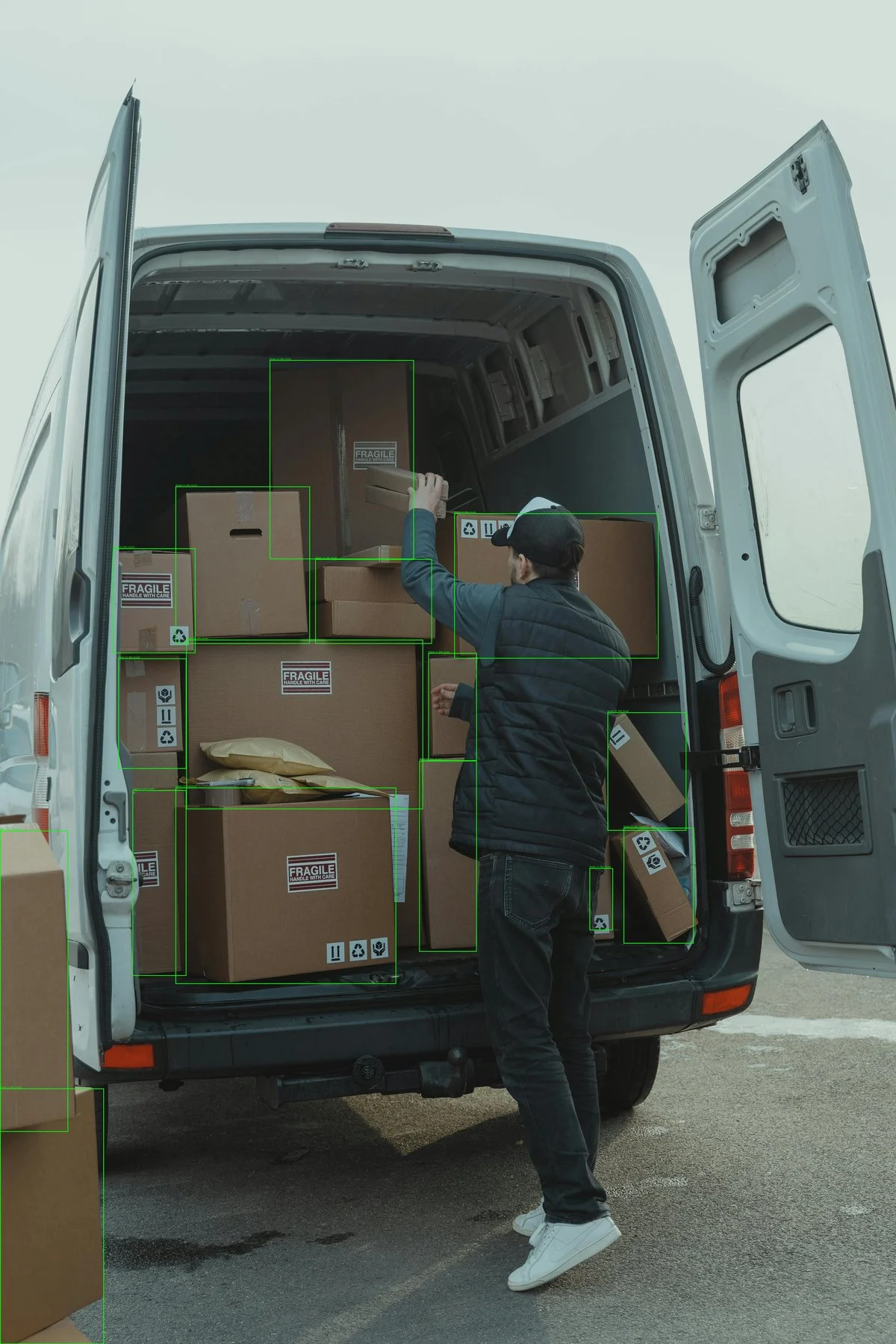
Detect all objects as boxes
Omitcategories and exemplars to ask the model to return the objects it finds in the image. This is useful for exploratory labeling or scene inventory. Box output is the default.
curl https://api.perceptron.inc/v1/detect \
  -H "Content-Type: application/json" \
  -H "Authorization: Bearer $PERCEPTRON_API_KEY" \
  -d '{
    "media": {
      "type": "image",
      "image_url": "https://example.com/warehouse.jpg"
    },
    "config": {
      "output": "box",
      "reasoning_effort": "high"
    }
  }'
Detect target categories as boxes
Passcategories when you know the labels you want returned. Each detection mention is one of the requested categories.
curl https://api.perceptron.inc/v1/detect \
  -H "Content-Type: application/json" \
  -H "Authorization: Bearer $PERCEPTRON_API_KEY" \
  -d '{
    "media": {
      "type": "image",
      "image_url": "https://example.com/warehouse.jpg"
    },
    "categories": ["person", "hard_hat"],
    "config": {
      "output": "box",
      "reasoning_effort": "none"
    }
  }'
Detect one category as points
Setconfig.output to "point" when you want one pixel point per detection. With exactly one unique category and no exemplars, /v1/detect uses a direct point prompt and forces every returned mention to that category.
curl https://api.perceptron.inc/v1/detect \
  -H "Content-Type: application/json" \
  -H "Authorization: Bearer $PERCEPTRON_API_KEY" \
  -d '{
    "media": {
      "type": "image",
      "image_url": "https://example.com/warehouse.jpg"
    },
    "categories": ["forklift"],
    "config": {
      "output": "point",
      "reasoning_effort": "none"
    }
  }'
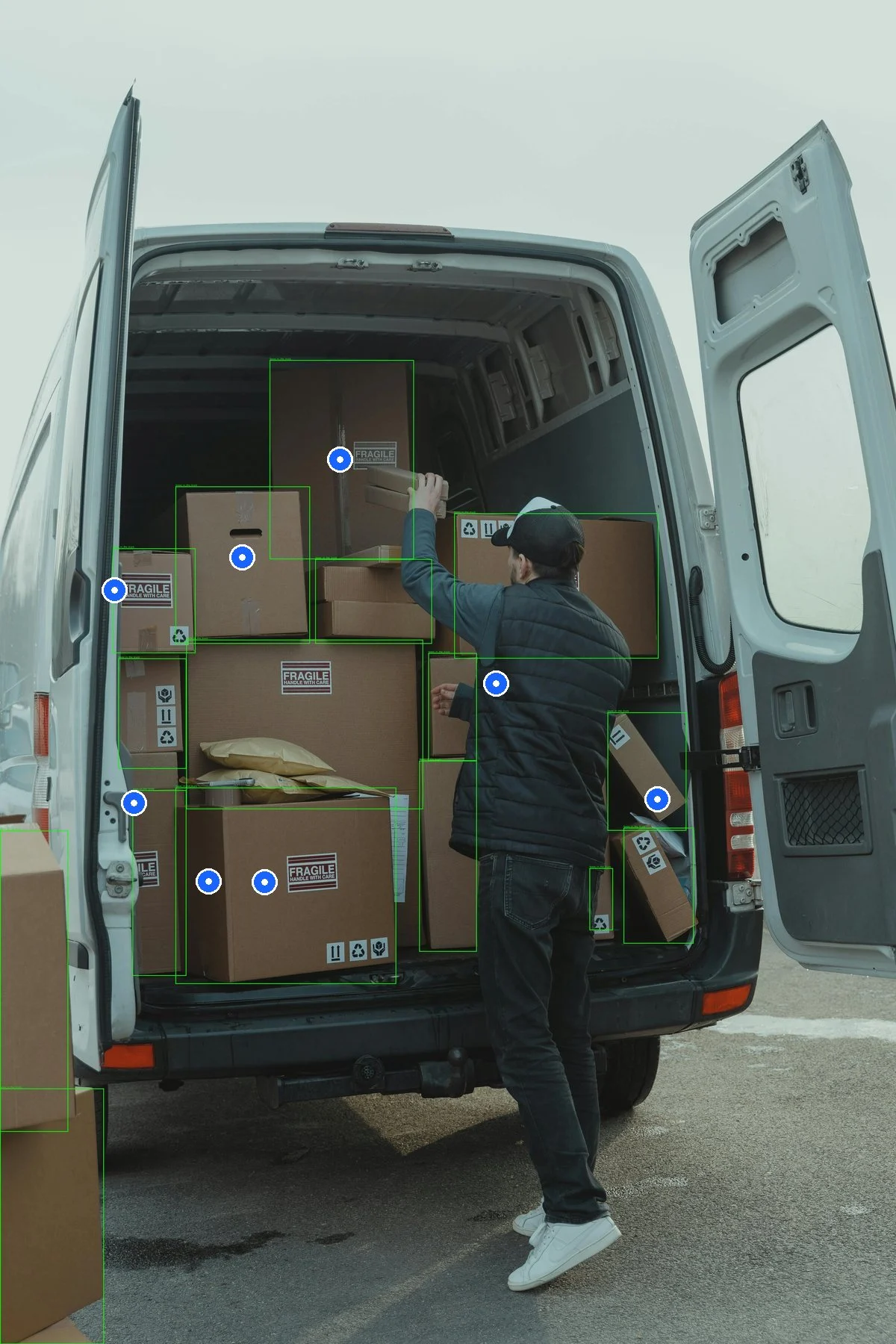
Detect all objects as points
You can also request point output without categories or exemplars. The route still uses exhaustive object detection internally, then returns the center point for each detected box or polygon.curl https://api.perceptron.inc/v1/detect \
-H "Content-Type: application/json" \
-H "Authorization: Bearer $PERCEPTRON_API_KEY" \
-d '{
"media": {
"type": "image",
"image_url": "https://example.com/warehouse.jpg"
},
"config": {
"output": "point"
}
}'
Detect from exemplars as boxes
Useexemplars when the target is visual or domain-specific. Exemplar annotations use pixel coordinates in the exemplar image. If you omit categories, the exemplar annotation mention values define the target labels.
curl https://api.perceptron.inc/v1/detect \
  -H "Content-Type: application/json" \
  -H "Authorization: Bearer $PERCEPTRON_API_KEY" \
  -d '{
    "media": {
      "type": "image",
      "image_url": "https://example.com/loading-dock.jpg"
    },
    "exemplars": [
      {
        "media": {
          "type": "image",
          "image_url": "data:image/png;base64,..."
        },
        "annotations": [
          {
            "mention": "damaged_box",
            "point_box": {
              "top_left": { "x": 124, "y": 80 },
              "bottom_right": { "x": 310, "y": 240 }
            }
          }
        ]
      }
    ],
    "config": {
      "output": "box"
    }
  }'
Detect from exemplars as points
For exemplar-guided point output, setconfig.output to "point". Positive exemplars can use either point or point_box annotations. The route uses the exemplar labels to find matching objects, then returns a point for each detection.
curl https://api.perceptron.inc/v1/detect \
  -H "Content-Type: application/json" \
  -H "Authorization: Bearer $PERCEPTRON_API_KEY" \
  -d '{
    "media": {
      "type": "image",
      "image_url": "https://example.com/loading-dock.jpg"
    },
    "categories": ["damaged_box"],
    "exemplars": [
      {
        "media": {
          "type": "image",
          "image_url": "data:image/png;base64,..."
        },
        "annotations": [
          {
            "mention": "damaged_box",
            "point": { "x": 218, "y": 160 }
          },
          {
            "mention": "damaged_box",
            "point_box": {
              "top_left": { "x": 124, "y": 80 },
              "bottom_right": { "x": 310, "y": 240 }
            }
          }
        ]
      }
    ],
    "config": {
      "output": "point"
    }
  }'
Configure reasoning
Useconfig.reasoning_effort with none, minimal, low, medium, or high. The default is none; minimal currently uses the same reasoning level as low. The setting belongs inside config on /v1/detect, unlike the top-level field on chat completions and Multilook. An unsupported value returns HTTP 400.
The effect depends on the detection mode:
- No categories or exemplars: a value other than
noneenables model reasoning, for either box or point output. The first example useshigh. Reasoning stays internal; the response containsdetectionsandfinish_reason, without reasoning text. - Categories with box output, without positive or negative exemplars: a value other than
noneselects a detection workflow that can inspect additional image regions. It does not enable model reasoning, and the non-nonetiers do not select different reasoning levels in this mode. - Category-based point output or any exemplar-guided request: the field is accepted, but model reasoning remains disabled and the selected tier does not change the detection workflow.
config.enable_thinking remains a deprecated alias: true maps to high, and false maps to none. An explicit config.reasoning_effort takes precedence when both are supplied. For example, {"reasoning_effort": "none", "enable_thinking": true} keeps the resolved effort at none. Prefer sending only reasoning_effort.
Supported permutations
| Request shape | config.output | Behavior |
|---|---|---|
media only | "box" or omitted | Exhaustive object detection; returns point_box for every parsed object. |
media only | "point" | Exhaustive object detection; returns point values converted from parsed boxes or polygons. |
One or more categories entries, no positive exemplars | "box" | Category detection; returns point_box values. Duplicate categories are deduplicated for prompting. |
One unique categories entry, no positive or negative exemplars | "point" | Direct point prompt; every returned mention is forced to that category. |
Multiple unique categories entries | "point" | Category detection; returns centroid point values from parsed boxes or polygons. |
Positive exemplars, with or without categories | "box" | Exemplar-guided detection; returns point_box values. If categories is omitted, exemplar mention values define the target labels. |
Positive exemplars, with or without categories | "point" | Exemplar-guided detection; returns point values. Exemplar annotations may use point or point_box. |
negative_exemplars with categories or positive exemplars | "box" or "point" | Uses negative images as examples of what not to detect. Negative exemplars do not define labels. |
negative_exemplars only | Any | Invalid request; include at least one category or positive exemplar. |
Example response
Box response
{
  "detections": [
    {
      "mention": "hard_hat",
      "point_box": {
        "top_left": { "x": 384.0, "y": 108.0 },
        "bottom_right": { "x": 768.0, "y": 540.0 }
      }
    }
  ],
  "finish_reason": "complete"
}
Point response
{
  "detections": [
    {
      "mention": "forklift",
      "point": { "x": 512.0, "y": 320.0 }
    }
  ],
  "finish_reason": "complete"
}
Notes
/v1/detectsupports image inputs only.config.outputcan be"box"or"point"; the default is"box". The public value is"box", not"bbox".- The response does not include confidence scores.
finish_reasonis"complete"or"max_tokens".- When
categoriesis set, every positive exemplar annotationmentionmust exactly match one of those categories. - Exemplar annotations must include exactly one of
pointorpoint_box. - Point outputs may come from parsed points directly, or from the centroid of a parsed box or polygon.
config.reasoning_effortdoes not change the response schema; its effect on detection depends on the request mode described above.
Limits
| Limit | Value |
|---|---|
categories entries | 256 |
Positive exemplars | 64 |
negative_exemplars | 64 |
| Annotations per exemplar | 256 |
Authorizations
Bearer token authentication using your Perceptron API key
Body
application/json